MTG tournament tracking without spreadsheet chaos.
Prepare the event, log each round in seconds between matches, and see afterwards what happened: your record, the decks you met, how the day went and what to change. Paper and Magic Online, free.
Free, no time limitBuilt for a phonePaper and onlineMagic Online sync
Round4 of 8 · Swiss
Opponent deckBoros Convoke
Result
2-0 Win2-1 Win1-2 Loss0-2 LossBye
Started
On the playOn the draw
The round entry: one tap for the result, one for who started. Illustration of the form.
Secondsto log a round with the score presets
Round by roundthe opponent's deck, who started and the games
Paper and onlineleagues, FNM, RCQs, challenges and more
€0to start, no time limit on the core product
Made for the table
A tournament is eight rounds in a day with no time to type. Everything here is built to take seconds at the table and to give a lot back afterwards.
Quick score presets
One tap for 2-0 Win, 2-1 Win, 1-2 Loss, 0-2 Loss, 1-1 Draw or Bye, so logging a round takes seconds between matches.
Round-by-round history
The opponent's deck, who started, mulligans and the result of each game, with byes and intentional draws counted the way a tournament counts them.
Game by game
From game 2 save what you sided in and out, and copy the plan to the later games in one tap. The detail stays collapsed until you want it.
Prepare the event
Three short steps: the event, the field you expect and the deck you bring. It is free, and it ends in your sideboard sheet and its PDF.
A list you can read
Every tournament is a row with the deck, the record and one chip per round. Tap a chip to see the opponent's deck, the score and who started.
A finish measured fairly
Your placement counts against the size of the event: ninth of 64 players is worth more than first of 5, and a top 8 only counts in a field of 16 or more.
Scout
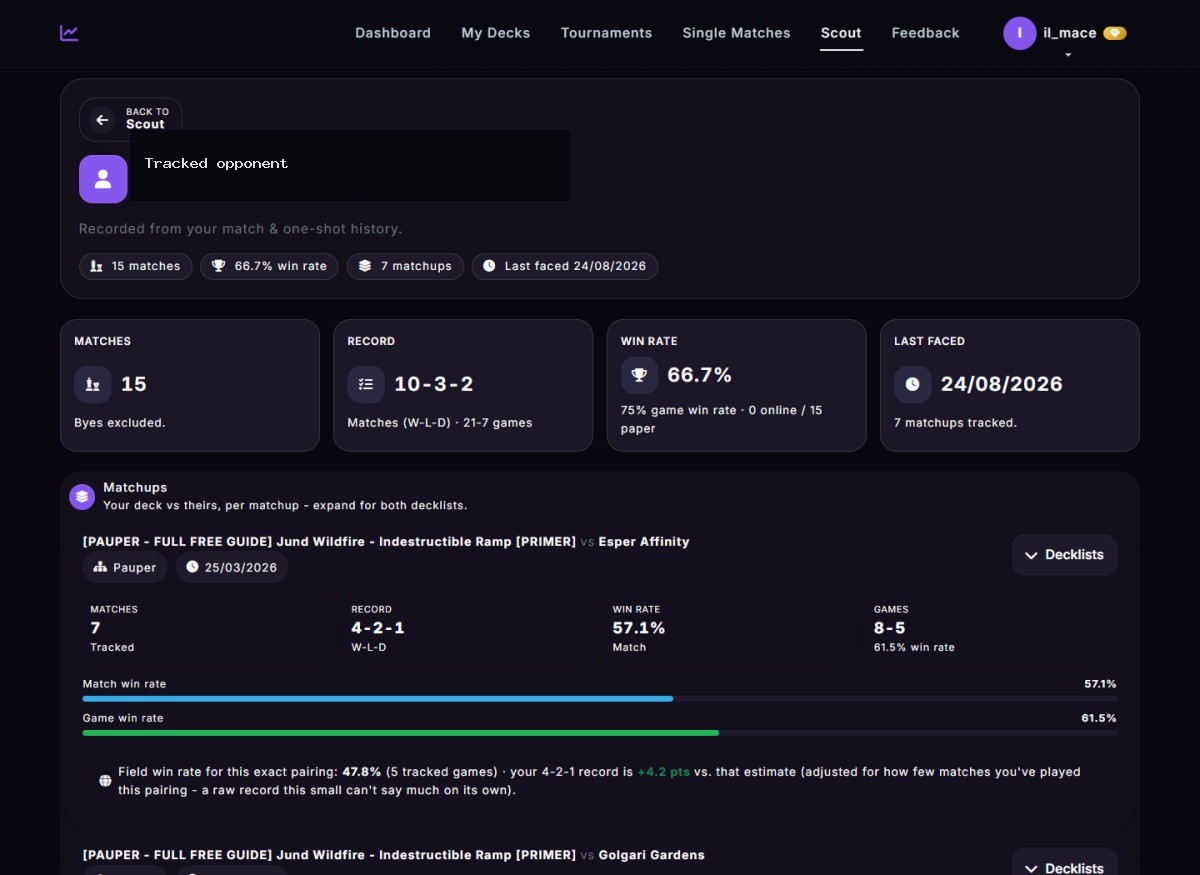
Write the opponent's name on a round and Scout builds their history: your record against them, the decks they play and a private note for next time.
Your deck over time
Every round feeds the deck's matchup table and its Meta tab, so you see which decks keep producing results and which matchups cost you.
A picture of the result
Each tournament has a picture to save or share: the record, a chip per round, the deck and the placement. It never shows your opponents' names.
Life tracker
Count life on your phone and the games go straight into the form of the round, with no second pass at the end.
Your local field
The decks you meet at each paper venue, with your results against them: the field to prepare for at your own table.
ID calculator
In the last round, simulate thousands of tournaments like yours and see whether drawing or playing makes the top cut more often.
Before, during and after the event
Prepare itPrepare a tournament in three short steps: the event, the field you expect and the deck you bring. It is free, and it ends in your sideboard sheet and its PDF.
Log every roundAdd a round with the presets, the opponent's deck and who started. Mulligans, per-game results and sideboarding are there when you want them, collapsed when you do not.
Read what happenedYour tournaments list shows each result with a chip per round. Tap a chip to see the opponent's deck and the score, or open the tournament for the round by round report.
Share it or keep itSend the picture of the result, export the report as a PDF, or download all your tournaments to a spreadsheet.
What the rounds turn into
Every opponent becomes a report
Write the opponent's name on a round and Scout builds the history for you: your record against them, the decks they play, your results against the field for that exact pairing, and a private note for next time.
Match history with a link back to the round
Notes only you can see
Playing on Magic Online? Skip the typing
The free MTGO desktop client for Windows watches your live games and syncs the matches to your account on its own, so your online rounds are there without any manual entry.
Leagues and challenges recognised, with your deck and the opponent's cards seen
Paper rounds are logged by hand, in seconds
From the results to the next event
The guided tools start from where you stand and lead to the next event: which matchups to work on, the list to bring and the pages to take with you.
Free: the event preparation and the sideboard sheet
Premium: the guided paths around them
A notebook, or a tournament tracker?
Writing results down is a good start. Reading them back after twenty events is where a notebook gives up.
A notebook or a spreadsheet
MyDeckStats
Logging a round
Free text, typed after the match
Score presets, the opponent's deck and who started in a few taps
Byes and draws
Counted by hand
Counted correctly in every record and rate
Your record against a deck
Search and count
A matchup table that fills itself, with a likely range
Getting ready for an event
A list in a notes app
The field you expect, the deck you bring and a sideboard sheet with its PDF
Magic Online
Typed in afterwards
Sent by the free Windows client
Seeing progress
Scroll and compare
Win rate over time, by round, after a loss, by venue and by day
Sharing a result
A screenshot of a page
A picture of the tournament and a public report
Every kind of event
LeagueFriday Night MagicRCQStore ChampionshipChallengePreliminaryQualifierPaupergeddonEternal WeekendLocal eventDraftSealed
Format and deck buttons filtered to what applies, instead of long dropdowns
Opponent deck and opponent name tracked separately, no forced autofill
One-shots for league matches or testing sessions outside a tournament structure
Win rates on the play and on the draw split out automatically once you have enough games
Tournaments imported from TopDeck.gg, matches from Magic Online by the client
A PDF report and a spreadsheet download of everything you logged
Common questions
What should an MTG tournament tracker record?
It should record events, rounds, records, decks played, matchup outcomes and long-term performance, and let you read them back in a way that tells you what to change.
How does MyDeckStats help with tournaments?
MyDeckStats keeps tournaments, decks and matchups connected, with quick score presets so logging a round takes seconds, and turns the rounds into matchup tables, opponent reports and a result you can share.
Can I prepare for an event before it starts?
Yes. Prepare a tournament is free: pick the event, the field you expect and your deck, and take your sideboard sheet with you. Premium adds a plan for every matchup.
Can I track repeated testing sessions too?
Yes. One-shots cover league matches and testing sessions outside a full tournament structure, and feed the same statistics.
Does it work on Magic Online?
Yes. The free Windows client watches your games and sends each match to your account, with your deck and the opponent's cards seen. Paper rounds are logged by hand.
Are byes and intentional draws counted right?
Yes. A bye counts as a win and an intentional draw as a draw in a tournament record, and the statistics leave out what says nothing about your play.
How is a good finish judged?
Against the size of the event. Ninth of 64 players beats first of 5, so the best finish of your year is the one that beat the most of its field.
Can I share a result?
Yes. Every tournament with rounds has a picture to save or send from your phone, and a public page you can link. The picture never shows opponent names, notes or the venue.
Is tournament tracking free?
Yes, with no time limit. Tournaments, one-shots, Scout, and the matchup and statistics pages built from them are part of the free product.