MTG Sideboard Planner

Build sideboard plans you can actually reuse.

Keep a plan for every matchup next to the deck it belongs to: what comes in, what goes out, on the play and on the draw. The plans learn from the games you log, flag themselves when your list changes and go to the table as a PDF.

Free, no time limit PDF included On the play and on the draw Shared with your team
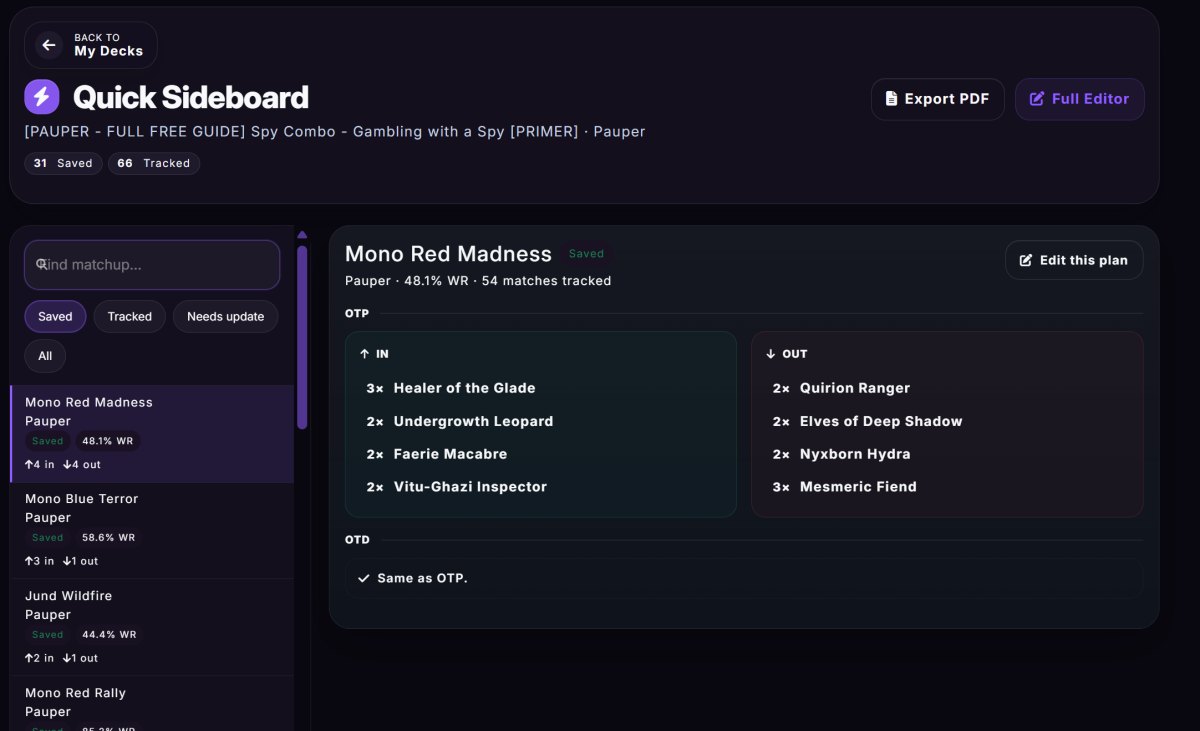
A real Quick Sideboard page with saved plans for real matchups
Per matchupone plan for each opponent archetype
Play and drawseparate plans when they differ
From your gamesthe best observed plan, ready to prefill
PDFand a compact one to print for the event

Plans that learn from your games

A plan you only remember is a plan you rebuild at every event. Here it lives with the deck, is checked against your list and gets better with every game.

Matchup-by-matchup plans

For each opponent archetype in your format, save the cards that come in and out, ready on screen during a round.

Play and draw

Save a different plan on the play and on the draw, or one plan for both. When they are the same it is shown once.

Backed by data, not memory

Once you have enough tracked games the sheet shows the best observed plan and which cards actually recur in your wins.

One-click prefill

Use the best observed plan to prefill the sheet instead of retyping the same in and out list every time.

Knows your list

A plan that brings in more copies than your sideboard holds, or takes out more than your main deck plays, is flagged as needing an update.

Opponent first

The quick view puts the opponent's deck first, so the matchup you are about to play is the main thing on screen, not a row in a list.

Cards as images or a list

Pick the cards as images with the copies on them, or as a plain list. The choice is remembered on your device.

Post-side study

Your win rate after siding, matchup by matchup, and the cards you bring in and take out most often across the games you logged.

PDF for the table

Export the sheet as a PDF, or the compact version for a printable tournament reference.

One plan for the team

In a test group the whole team keeps one plan for each matchup: pick the cards from the lists of the group's decks and anyone can update it.

Matchup plan (Premium)

The guided Matchup plan tool goes from where you stand to a plan for every matchup, your opening hands and the pages to take to the event.

Fix my deck (Premium)

A sideboard study of the cards that earn their slot, and a place to test a new list before you register it.

Four steps to a plan you trust

  1. Open the quick viewFrom a deck, the quick sideboard page puts the opponent's deck first, so the matchup you are about to play is the main thing on screen.
  2. Save what comes in and outWrite the swaps once per matchup, with separate plans on the play and on the draw when they differ.
  3. Let your games correct itLog the games with their sideboarding and the sheet shows the best observed plan and the cards that recur in your wins.
  4. Take it with youExport the sheet as a PDF, or the compact version for a printable tournament reference, or share the plan with your group.

Before you sit down

The quick sideboard sheet: one row per matchup with the cards to bring in and take out

The sheet you read during a round

One row for each opponent archetype with a preview of the plan, a filter for the saved ones and for the ones that need an update, and the plan on the play and on the draw one tap away.

  • Saved, tracked and needs-update filters
  • On the play and on the draw side by side
  • A compact PDF for the event
The matchup table of a deck: every opponent with its record, win rates on the play and on the draw and a Plan button

Start from the matchups that matter

The deck page lists every opponent you have faced with your record against them and a Plan button on each row, so you spend your sideboard time where it pays: the matchups you play most and lose most.

  • Match and game win rate, on the play and on the draw
  • A Plan button on every matchup
  • The Meta tab sets it next to the real field
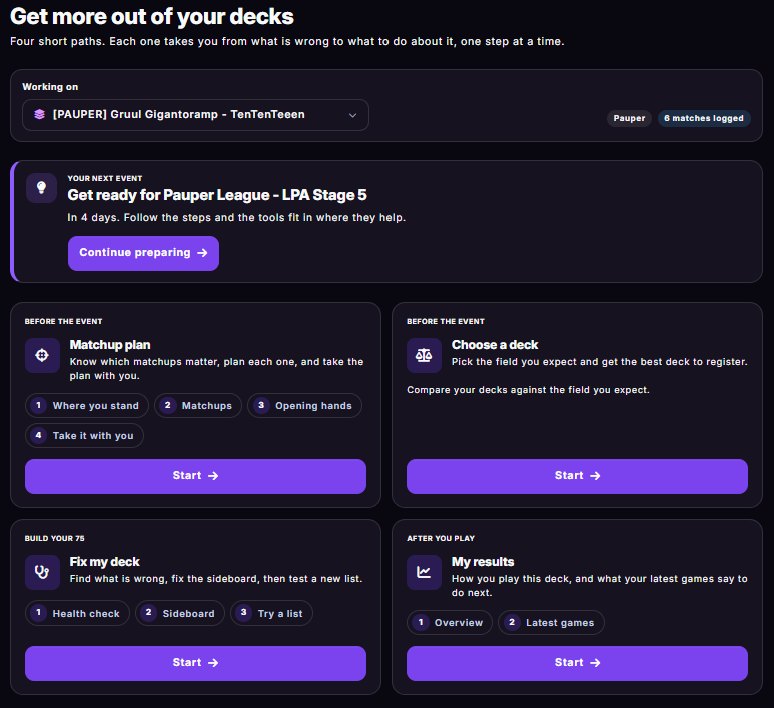
The Tools page: four guided paths, with the next event and the deck you are working on

Premium: a plan for every matchup

The Matchup plan tool goes from where you stand to a plan for each matchup, your opening hands, and the PDFs and checklist to take to the event. The sideboard sheet stays free; Premium adds the guided path around it.

  • Where you stand: the matchups to work on first
  • Take it with you: PDFs and a checklist

From memory to a sheet

Most players side from memory. It works until the matchup you have not seen for a month.

From memory or a noteMyDeckStats
Where the plan livesIn your head or a notes appWith the deck and the matchup it belongs to
On the play or on the drawOne plan, or two you must rememberTwo plans, shown once when they are equal
When the list changesThe plan silently breaksThe plan is flagged as needing an update
Is it right?A feelingThe best observed plan and the cards that recur in your wins
At the tableA crumpled sheetThe opponent-first view, or a PDF
With a teamA chat threadOne plan per matchup that everyone can update

Also included, free

  • On the Play and On the Draw variants for the same matchup, side by side
  • PDF export, a compact version too, for a printable tournament reference
  • Opponent-first quick view: the matchup you are about to play is the main focus
  • Recurring side-in and side-out card study across your tracked games
  • Plans shared with a test group, with the cards picked from the group's lists
  • Per-game sideboarding saved with each round you log

Common questions

What makes a good MTG sideboard planner?
A good sideboard planner connects decklists, matchup notes and real event results in one workflow, and tells you when a plan no longer fits your list.
Can MyDeckStats help with sideboard notes?
Yes. MyDeckStats keeps sideboard plans next to the decks and matchups they belong to, and can prefill a plan from your own tracked results.
Can I have a different plan on the play and on the draw?
Yes. Each matchup can have a plan for the play, a plan for the draw or one for both, and equal plans are shown once.
Is this useful only for tournaments?
No. It also helps during testing, because repeated notes become easier to compare and refine.
Is the sideboard sheet free?
Yes, with no time limit, including PDF export.
What does Premium add to sideboarding?
Premium adds the guided Matchup plan and Fix my deck tools: a plan for every matchup, a sideboard study of the cards that earn their slot, and a place to test a new list.
Can my team share sideboard plans?
Yes. In a test group the whole team keeps one plan for each matchup, picks the cards from the lists of the group's decks and can update it after every session.
Can I print my plans?
Yes. Export the sheet as a PDF, or the compact version made to be printed as a tournament reference.

Keep reading

Ready to try it?

Write the plan once, use it every round.

Free to start, no time limit on the core product.

Build sideboard plans